
Tutorials
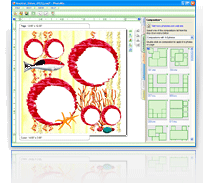
PhotoMix templates are not meant to be used for just one collage but an infinite number of collages! Once you’re done with one, there’s never a need to start from scratch! Check out this tutorial video to learn how to come up with new collages using old temples within minutes!
Scrapbooks and collages are not the same without your own captions. Placing text is one way to make your project more personal. Doing this is easy and it only takes a few seconds of your time. View this tutorial video to learn how to place your own texts in seconds!
After downloading your copy of the PhotoMix software, you will only get the limited trial version where some very cool features are disabled. Check out this tutorial video specially prepared for you to easily learn how to unlock all the features by registering the serial number that you have purchased.
Purchasing the PhotoMix software will allow you to download an unlimited number of available templates for free! However, this privilege is useless if you do not know how to make full use of these templates. View this video for a step-by-step tutorial on how to make use of PhotoMix templates.